Task CFG03: Configure L3 connectivity between external network and fabric
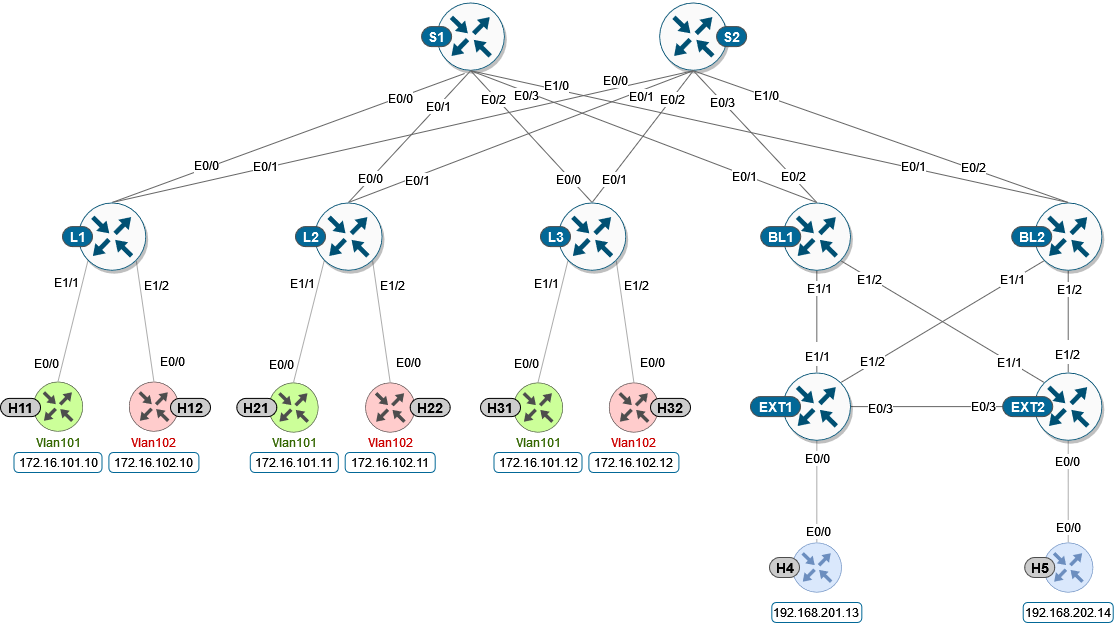
In this task we are configuring the more complex topology with a connectivity between fabric and external networks, using the Border Leaf switches.
Note
External connectivity allows the movement of Layer 2 and Layer 3 traffic between an EVPN VXLAN network and an external network. It also enables the EVPN VXLAN network to exchange routes with the externally connected network.
Routes within an EVPN VXLAN network are already shared between all the VTEPs/Leafs.
External connectivity uses the Leafs on the periphery of the network to pass on these routes to an external Layer 2 or Layer 3 network. Similarly, the EVPN VXLAN network imports the reachability routes from the external network.
To get started, please select in lab manager option 03 to initialize lab devices.
Note
At the beginning of the task Border Leafs are fully integrated to the fabric, External network is configured.
L3 interfaces in a dedicated VRF “green” are used on Border Leafs for external connectivity between borders and external nodes.
Step 1: Configure routing between BL1/2 and EXT1/2
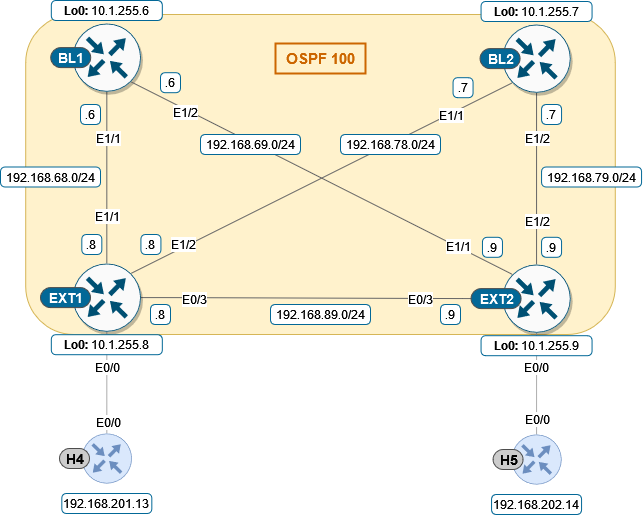
First, we need to configure underlay and OSPF for routes exchange (area 0 is used for the lab scenario). Note that Border Leaf 1 and 2 interfaces towards EXT nodes are part of VRF “green”.
EXT1 node
 1conf t
 2!
 3interface e1/1
 4 no sw
 5 no shut
 6 ip addr 192.168.68.8 255.255.255.0
 7 ip ospf 100 area 0
 8 ip ospf net point-to-point
 9!
10interface e1/2
11 no sw
12 no shut
13 ip addr 192.168.78.8 255.255.255.0
14 ip ospf 100 area 0
15 ip ospf net point-to-point
EXT2 node
 1conf t
 2!
 3interface e1/1
 4 no sw
 5 no shut
 6 ip addr 192.168.69.9 255.255.255.0
 7 ip ospf 100 area 0
 8 ip ospf net point-to-point
 9!
10interface e1/2
11 no sw
12 no shut
13 ip addr 192.168.79.9 255.255.255.0
14 ip ospf 100 area 0
15 ip ospf net point-to-point
BL1 node
 1conf t
 2!
 3router ospf 100 vrf green
 4 router-id 172.16.255.6
 5!
 6interface e1/1
 7 no sw
 8 no shut
 9 vrf for green
10 ip addr 192.168.68.6 255.255.255.0
11 ip ospf 100 area 0
12 ip ospf net point-to-point
13!
14interface e1/2
15 no sw
16 no shut
17 vrf for green
18 ip addr 192.168.69.6 255.255.255.0
19 ip ospf 100 area 0
20 ip ospf net point-to-point
BL2 node
 1conf t
 2!
 3router ospf 100 vrf green
 4 router-id 172.16.255.7
 5!
 6interface e1/1
 7 no sw
 8 no shut
 9 vrf for green
10 ip addr 192.168.78.7 255.255.255.0
11 ip ospf 100 area 0
12 ip ospf net point-to-point
13!
14interface e1/2
15 no sw
16 no shut
17 vrf for green
18 ip addr 192.168.79.7 255.255.255.0
19 ip ospf 100 area 0
20 ip ospf net point-to-point
To verify that OSPF is converged properly, check the neighborship status and routes exchange:
BL1 node
 1cfg03-BL1#show ip ospf 100 neighbor
 2Neighbor ID     Pri   State           Dead Time   Address         Interface
 3192.168.255.9     0   FULL/  -        00:00:30    192.168.69.9    Ethernet1/2
 4192.168.255.8     0   FULL/  -        00:00:35    192.168.68.8    Ethernet1/1
 5
 6cfg03-BL1#show ip route vrf green ospf | begin Gateway
 7Gateway of last resort is not set
 8
 9O     192.168.78.0/24 [110/20] via 192.168.68.8, 00:02:34, Ethernet1/1
10O     192.168.79.0/24 [110/20] via 192.168.69.9, 00:02:31, Ethernet1/2
11O     192.168.89.0/24 [110/20] via 192.168.69.9, 00:02:31, Ethernet1/2
12                      [110/20] via 192.168.68.8, 00:02:34, Ethernet1/1
13O IA  192.168.201.0/24 [110/11] via 192.168.68.8, 00:02:34, Ethernet1/1
14O IA  192.168.202.0/24 [110/11] via 192.168.69.9, 00:02:31, Ethernet1/2
15    192.168.255.0/32 is subnetted, 2 subnets
16O        192.168.255.8 [110/11] via 192.168.68.8, 00:02:34, Ethernet1/1
17O        192.168.255.9 [110/11] via 192.168.69.9, 00:02:31, Ethernet1/2
BL2 node
 1cfg03-BL2#show ip ospf 100 neighbor
 2Neighbor ID     Pri   State           Dead Time   Address         Interface
 3192.168.255.9     0   FULL/  -        00:00:34    192.168.79.9    Ethernet1/2
 4192.168.255.8     0   FULL/  -        00:00:31    192.168.78.8    Ethernet1/1
 5
 6cfg03-BL2#show ip route vrf green ospf | begin Gateway
 7Gateway of last resort is not set
 8
 9O     192.168.68.0/24 [110/20] via 192.168.78.8, 00:08:40, Ethernet1/1
10O     192.168.69.0/24 [110/20] via 192.168.79.9, 00:08:36, Ethernet1/2
11O     192.168.89.0/24 [110/20] via 192.168.79.9, 00:08:36, Ethernet1/2
12                      [110/20] via 192.168.78.8, 00:08:40, Ethernet1/1
13O IA  192.168.201.0/24 [110/11] via 192.168.78.8, 00:08:40, Ethernet1/1
14O IA  192.168.202.0/24 [110/11] via 192.168.79.9, 00:08:36, Ethernet1/2
15    192.168.255.0/32 is subnetted, 2 subnets
16O        192.168.255.8 [110/11] via 192.168.78.8, 00:08:40, Ethernet1/1
17O        192.168.255.9 [110/11] via 192.168.79.9, 00:08:36, Ethernet1/2
EXT1 node
1cfg03-EXT1#show ip ospf neighbor
2Neighbor ID     Pri   State           Dead Time   Address         Interface
3172.16.255.7      0   FULL/  -        00:00:32    192.168.78.7    Ethernet1/2
4172.16.255.6      0   FULL/  -        00:00:33    192.168.68.6    Ethernet1/1
5192.168.255.9     0   FULL/  -        00:00:34    192.168.89.9    Ethernet0/3
EXT2 node
1cfg03-EXT2#show ip ospf neighbor
2Neighbor ID     Pri   State           Dead Time   Address         Interface
3172.16.255.7      0   FULL/  -        00:00:34    192.168.79.7    Ethernet1/2
4172.16.255.6      0   FULL/  -        00:00:32    192.168.69.6    Ethernet1/1
5192.168.255.8     0   FULL/  -        00:00:39    192.168.89.8    Ethernet0/3
Step 2: Redistribute OSPF 100 to BGP 65001 and vice versa on BL1/2
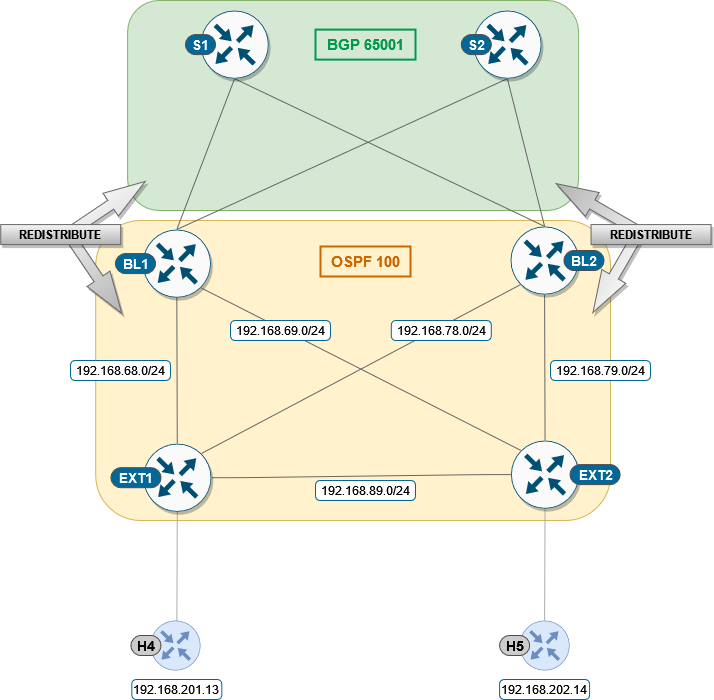
Next, redistribution of between OSPF and BGP has to be done on the Border Leafs. Such redistribution of the IGP is required in the BGP VRF address family to distribute the external prefixes into the BGP EVPN VXLAN fabric.
BL1/BL2 node
1conf t
2router ospf 100 vrf green
3 redistr bgp 65001 subnets
4!
5router bgp 65001
6 add ipv4 uni vrf green
7  redistribute ospf 100
Once we configured redistribution between OSPF and BGP, we can see on EXT devices host /32 routes from the fabric.
EXT1 node
 1cfg03-EXT1#show ip route 172.16.0.0 255.255.0.0 longer-prefixes
 2
 3    172.16.0.0/32 is subnetted, 6 subnets
 4O E2     172.16.101.10 [110/1] via 192.168.78.7, 00:01:23, Ethernet1/2
 5                       [110/1] via 192.168.68.6, 00:01:29, Ethernet1/1
 6O E2     172.16.101.11 [110/1] via 192.168.78.7, 00:01:23, Ethernet1/2
 7                       [110/1] via 192.168.68.6, 00:01:29, Ethernet1/1
 8O E2     172.16.101.12 [110/1] via 192.168.78.7, 00:01:23, Ethernet1/2
 9                       [110/1] via 192.168.68.6, 00:01:29, Ethernet1/1
10O E2     172.16.102.10 [110/1] via 192.168.78.7, 00:01:23, Ethernet1/2
11                       [110/1] via 192.168.68.6, 00:01:29, Ethernet1/1
12O E2     172.16.102.11 [110/1] via 192.168.78.7, 00:01:23, Ethernet1/2
13                       [110/1] via 192.168.68.6, 00:01:29, Ethernet1/1
14O E2     172.16.102.12 [110/1] via 192.168.78.7, 00:01:23, Ethernet1/2
15                       [110/1] via 192.168.68.6, 00:01:29, Ethernet1/1
EXT2 node
 1cfg03-EXT2#show ip route 172.16.0.0 255.255.0.0 longer-prefixes
 2
 3    172.16.0.0/32 is subnetted, 6 subnets
 4O E2     172.16.101.10 [110/1] via 192.168.79.7, 00:01:59, Ethernet1/2
 5                       [110/1] via 192.168.69.6, 00:02:05, Ethernet1/1
 6O E2     172.16.101.11 [110/1] via 192.168.79.7, 00:01:59, Ethernet1/2
 7                       [110/1] via 192.168.69.6, 00:02:05, Ethernet1/1
 8O E2     172.16.101.12 [110/1] via 192.168.79.7, 00:01:59, Ethernet1/2
 9                       [110/1] via 192.168.69.6, 00:02:05, Ethernet1/1
10O E2     172.16.102.10 [110/1] via 192.168.79.7, 00:01:59, Ethernet1/2
11                       [110/1] via 192.168.69.6, 00:02:05, Ethernet1/1
12O E2     172.16.102.11 [110/1] via 192.168.79.7, 00:01:59, Ethernet1/2
13                       [110/1] via 192.168.69.6, 00:02:05, Ethernet1/1
14O E2     172.16.102.12 [110/1] via 192.168.79.7, 00:01:59, Ethernet1/2
15                       [110/1] via 192.168.69.6, 00:02:05, Ethernet1/1
Step 3: Configure the BGP aggregation route-map
Redistribution of all host routes in fabric to external network may not be always desired since it can significantly increase size of routing table in external network depending on number of hosts in fabric. Therefore, we will implement aggregation of these routes in BGP for VRF green and we will aggregate all /32 routes under single /16 route.
BL1/BL2 nodes
 1conf t
 2!
 3router bgp 65001
 4 add ipv4 uni vrf green
 5  aggregate-address 172.16.0.0 255.255.0.0 summary-only
 6!
 7ip prefix-list PL-BGP-TO-OSPF permit 172.16.0.0/16
 8!
 9route-map RM-BGP-TO-OSPF p 10
10 match ip address prefix-list PL-BGP-TO-OSPF
11!
12router ospf 100 vrf green
13 redistribute bgp 65001 route-map RM-BGP-TO-OSPF
After we updated our configuration of redistribution, we can see that EXT devices now holds only single /16 route, which aggregates host /32 routes from fabric.
Note
It may take few seconds till aggregate route will appear in routing table.
EXT1 node
1cfg03-EXT1#show ip route 172.16.0.0 255.255.0.0 longer-prefixes
2
3O E2  172.16.0.0/16 [110/1] via 192.168.78.7, 00:00:25, Ethernet1/2
4                    [110/1] via 192.168.68.6, 00:00:25, Ethernet1/1
EXT2 node
1cfg03-EXT2#show ip route 172.16.0.0 255.255.0.0 longer-prefixes
2
3O E2  172.16.0.0/16 [110/1] via 192.168.79.7, 00:00:38, Ethernet1/2
4                    [110/1] via 192.168.69.6, 00:00:38, Ethernet1/1
Step 4: Verification
At the end of the task the connectivity should be established between hosts in the fabric (Hosts 1X/2X/3X) and Hosts in the external network (Hosts 4/5), which you can verify with the ping test, e.g. from Host 1 to Host 4:
H11 node
 1cfg03-H11#ping 192.168.201.13
 2Type escape sequence to abort.
 3Sending 5, 100-byte ICMP Echos to 192.168.201.13, timeout is 2 seconds:
 4.!!!!
 5Success rate is 80 percent (4/5), round-trip min/avg/max = 1/1/2 ms
 6
 7cfg03-H11#ping 192.168.202.14
 8Type escape sequence to abort.
 9Sending 5, 100-byte ICMP Echos to 192.168.202.14, timeout is 2 seconds:
10.!!!!
11Success rate is 80 percent (4/5), round-trip min/avg/max = 1/1/2 ms
Also, connectivity could be verified to the loopback of the external routers EXT1 and EXT2:
H11 node
 1cfg03-H11#ping 192.168.255.8
 2Type escape sequence to abort.
 3Sending 5, 100-byte ICMP Echos to 192.168.255.8, timeout is 2 seconds:
 4!!!!!
 5Success rate is 100 percent (5/5), round-trip min/avg/max = 1/1/1 ms
 6
 7cfg03-H11#ping 192.168.255.9
 8Type escape sequence to abort.
 9Sending 5, 100-byte ICMP Echos to 192.168.255.9, timeout is 2 seconds:
10!!!!!
11Success rate is 100 percent (5/5), round-trip min/avg/max = 1/1/1 ms
Additionally, you can check routing information.
EXT1 node
 1cfg03-EXT1#show ip route ospf | begin Gateway
 2Gateway of last resort is not set
 3
 4O E2  172.16.0.0/16 [110/1] via 192.168.78.7, 00:02:30, Ethernet1/2
 5                    [110/1] via 192.168.68.6, 00:02:30, Ethernet1/1
 6O     192.168.69.0/24 [110/20] via 192.168.89.9, 00:35:17, Ethernet0/3
 7                      [110/20] via 192.168.68.6, 00:34:04, Ethernet1/1
 8O     192.168.79.0/24 [110/20] via 192.168.89.9, 00:35:17, Ethernet0/3
 9                      [110/20] via 192.168.78.7, 00:33:46, Ethernet1/2
10O IA  192.168.202.0/24 [110/11] via 192.168.89.9, 00:39:05, Ethernet0/3
11    192.168.255.0/32 is subnetted, 2 subnets
12O        192.168.255.9 [110/11] via 192.168.89.9, 00:39:05, Ethernet0/3
EXT2 node
 1cfg03-EXT2#show ip route ospf | begin Gateway
 2Gateway of last resort is not set
 3
 4O E2  172.16.0.0/16 [110/1] via 192.168.79.7, 00:00:58, Ethernet1/2
 5                    [110/1] via 192.168.69.6, 00:00:58, Ethernet1/1
 6O     192.168.68.0/24 [110/20] via 192.168.89.8, 00:23:40, Ethernet0/3
 7                      [110/20] via 192.168.69.6, 00:14:36, Ethernet1/1
 8O     192.168.78.0/24 [110/20] via 192.168.89.8, 00:23:40, Ethernet0/3
 9                      [110/20] via 192.168.79.7, 00:13:57, Ethernet1/2
10O IA  192.168.201.0/24 [110/11] via 192.168.89.8, 00:23:19, Ethernet0/3
11    192.168.255.0/32 is subnetted, 2 subnets
12O        192.168.255.8 [110/11] via 192.168.89.8, 00:23:40, Ethernet0/3
BL1 node
 1cfg03-BL1#show bgp l2vpn evpn | include \[5\]
 2*>   [5][1:1][0][16][172.16.0.0]/17
 3*>   [5][1:1][0][24][192.168.68.0]/17
 4*>   [5][1:1][0][24][192.168.69.0]/17
 5* i  [5][1:1][0][24][192.168.78.0]/17
 6* i  [5][1:1][0][24][192.168.79.0]/17
 7*>   [5][1:1][0][24][192.168.89.0]/17
 8*>   [5][1:1][0][24][192.168.201.0]/17
 9*>   [5][1:1][0][24][192.168.202.0]/17
10*>   [5][1:1][0][32][192.168.255.8]/17
11*>   [5][1:1][0][32][192.168.255.9]/17
BL2 node
 1cfg03-BL2#show bgp l2vpn evpn | include \[5\]
 2*>   [5][1:1][0][16][172.16.0.0]/17
 3*>   [5][1:1][0][24][192.168.68.0]/17
 4*>   [5][1:1][0][24][192.168.69.0]/17
 5*>   [5][1:1][0][24][192.168.78.0]/17
 6*>   [5][1:1][0][24][192.168.79.0]/17
 7*>   [5][1:1][0][24][192.168.89.0]/17
 8*>   [5][1:1][0][24][192.168.201.0]/17
 9*>   [5][1:1][0][24][192.168.202.0]/17
10*>   [5][1:1][0][32][192.168.255.8]/17
11*>   [5][1:1][0][32][192.168.255.9]/17
L1 node
 1cfg03-L1#show ip route vrf green bgp | begin Gateway
 2Gateway of last resort is not set
 3
 4    172.16.0.0/16 is variably subnetted, 9 subnets, 3 masks
 5B        172.16.0.0/16 [200/0] via 10.1.254.6, 00:05:40, Vlan901
 6B        172.16.101.11/32 [200/0] via 10.1.254.4, 00:41:25, Vlan901
 7B        172.16.101.12/32 [200/0] via 10.1.254.5, 00:41:25, Vlan901
 8B        172.16.102.11/32 [200/0] via 10.1.254.4, 00:41:25, Vlan901
 9B        172.16.102.12/32 [200/0] via 10.1.254.5, 00:41:25, Vlan901
10B     192.168.68.0/24 [200/0] via 10.1.254.6, 00:24:32, Vlan901
11B     192.168.69.0/24 [200/0] via 10.1.254.6, 00:24:32, Vlan901
12B     192.168.78.0/24 [200/0] via 10.1.254.7, 00:24:28, Vlan901
13B     192.168.79.0/24 [200/0] via 10.1.254.7, 00:24:28, Vlan901
14B     192.168.89.0/24 [200/20] via 10.1.254.6, 00:24:32, Vlan901
15B     192.168.201.0/24 [200/11] via 10.1.254.6, 00:24:32, Vlan901
16B     192.168.202.0/24 [200/11] via 10.1.254.6, 00:24:32, Vlan901
17    192.168.255.0/32 is subnetted, 2 subnets
18B        192.168.255.8 [200/11] via 10.1.254.6, 00:24:32, Vlan901
19B        192.168.255.9 [200/11] via 10.1.254.6, 00:24:32, Vlan901
L2 node
 1cfg03-L2#show ip route vrf green bgp | begin Gateway
 2Gateway of last resort is not set
 3
 4    172.16.0.0/16 is variably subnetted, 9 subnets, 3 masks
 5B        172.16.0.0/16 [200/0] via 10.1.254.6, 00:06:26, Vlan901
 6B        172.16.101.10/32 [200/0] via 10.1.254.3, 00:42:11, Vlan901
 7B        172.16.101.12/32 [200/0] via 10.1.254.5, 00:42:11, Vlan901
 8B        172.16.102.10/32 [200/0] via 10.1.254.3, 00:42:11, Vlan901
 9B        172.16.102.12/32 [200/0] via 10.1.254.5, 00:42:11, Vlan901
10B     192.168.68.0/24 [200/0] via 10.1.254.6, 00:25:18, Vlan901
11B     192.168.69.0/24 [200/0] via 10.1.254.6, 00:25:18, Vlan901
12B     192.168.78.0/24 [200/0] via 10.1.254.7, 00:25:14, Vlan901
13B     192.168.79.0/24 [200/0] via 10.1.254.7, 00:25:14, Vlan901
14B     192.168.89.0/24 [200/20] via 10.1.254.6, 00:25:18, Vlan901
15B     192.168.201.0/24 [200/11] via 10.1.254.6, 00:25:18, Vlan901
16B     192.168.202.0/24 [200/11] via 10.1.254.6, 00:25:18, Vlan901
17    192.168.255.0/32 is subnetted, 2 subnets
18B        192.168.255.8 [200/11] via 10.1.254.6, 00:25:18, Vlan901
19B        192.168.255.9 [200/11] via 10.1.254.6, 00:25:18, Vlan901
L3 node
 1cfg03-L3#show ip route vrf green bgp | begin Gateway
 2Gateway of last resort is not set
 3
 4    172.16.0.0/16 is variably subnetted, 9 subnets, 3 masks
 5B        172.16.0.0/16 [200/0] via 10.1.254.6, 00:06:49, Vlan901
 6B        172.16.101.10/32 [200/0] via 10.1.254.3, 00:42:34, Vlan901
 7B        172.16.101.11/32 [200/0] via 10.1.254.4, 00:42:34, Vlan901
 8B        172.16.102.10/32 [200/0] via 10.1.254.3, 00:42:34, Vlan901
 9B        172.16.102.11/32 [200/0] via 10.1.254.4, 00:42:34, Vlan901
10B     192.168.68.0/24 [200/0] via 10.1.254.6, 00:25:41, Vlan901
11B     192.168.69.0/24 [200/0] via 10.1.254.6, 00:25:41, Vlan901
12B     192.168.78.0/24 [200/0] via 10.1.254.7, 00:25:37, Vlan901
13B     192.168.79.0/24 [200/0] via 10.1.254.7, 00:25:37, Vlan901
14B     192.168.89.0/24 [200/20] via 10.1.254.6, 00:25:41, Vlan901
15B     192.168.201.0/24 [200/11] via 10.1.254.6, 00:25:41, Vlan901
16B     192.168.202.0/24 [200/11] via 10.1.254.6, 00:25:41, Vlan901
17    192.168.255.0/32 is subnetted, 2 subnets
18B        192.168.255.8 [200/11] via 10.1.254.6, 00:25:41, Vlan901
19B        192.168.255.9 [200/11] via 10.1.254.6, 00:25:41, Vlan901